A large network can be an opportunity for logistics providers facing rapid spikes in seasonal demand or relying on a specific type of trailer, as it ensures the needed flexibility. However, managing a large network can also increase the workload and decrease the fulfillment pace. Integrating a freight management system (FMS) can help with process efficiency. Here is how it works.
How to Integrate a Freight Management System
Assess Current State & Set Goals: You need to revise your workflows to understand what inefficiencies you want to address with FMS implementation (cost reduction, operational efficiency, automated document management), and what KPIs will demonstrate the success of your investment.
Select the Right FMS: Check out which FMS system offers the best integration capabilities within your ERP, CRM, or WMS software, and lets you receive quotes/shipment statuses/documentation from as well as quickly compare rates from different carriers.
Design the Integration: Create a data model to ensure you create a unified ecosystem with seamless data exchange. Or, better, check the integration workflow for FMS software below.
Implement & Integrate: Connect to the FMS via API, obtaining necessary accesses; check the workflows to ensure smooth data flow.
Train Your Team: Schedule training and offer guidance to ensure that system users understand workflows and can use the FMS to the full extent.
Automate Key Processes: Set up and tune automation for routine processes, which can be quoting, rate calculation of comparison, route optimization, invoice management, or order tracking.
Monitor & Optimize: Collect system data to track performance and collect insights on areas for improvement that will let you increase your operational efficiency.
Top Software Development Companies Specialize in Custom Freight Management Systems
1. IT Craft
IT Craft is distinguished for 25 years of hands-on experience in end-to-end software development for logistics, delivering freight management solutions that can be efficiently adapted to evolving process needs by businesses of all sizes, from early startups to large enterprises.
The clients highlight in their feedback that IT Craft’s FMS developers bring domain expertise, technical depth, and delivery reliability to their projects, ensuring uninterrupted operations and constant optimization. Combined with strong integration abilities, the above factors make IT Craft a great option for long-term partnerships.
Services & expertise: custom freight management solution development, freight management solution consulting, digital transformation, legacy freight management software modernization, user data migration and third-party API integrations, FMS software maintenance and cost optimization.
Technology stack: Java, TypeScript, C#, Python, Kotlin, Swift, React Native, Flutter, Xamarin/.NET MAUI, Spring, .NET, Flask, Laravel, Symfony, Node.js, React, Angular, Vue, Azure, AWS, GCP, DigitalOcean, HuggingFace, Tableau, LangChain.
Team size: 330+ experts.
- Top clients:
- MyCarrier, USA
Logistics Management System Development for MyCarrier
MyCarrier TMS is a leading system that connects shippers and carriers seamlessly, ensuring efficient negotiations and freight tracking via an intuitive web portal.
The IT Craft development team helped the client with the MVP while completing a complex integration with a freight management platform under development. Later, the team helped the client transfer to another provider of freight management services without interrupting ongoing processes to meet changing business needs.
Results:
- $36.8M raised in funding.
- Leading TMS software by G2.
2. Ditstek
Ditstek should be on your list of prospective vendors for FMS development services when looking to balance logistics expertise, technological skills, and cost-effectiveness. It has necessary experience in building custom freight and transportation management systems that can support the entire logistics workflow.
Moreover, the company’s engineers can provide complex integrations and feature deliveries in an agile manner to adapt the FMS solution to evolving processes, emphasizing automation and operational efficiency. Excellent communication and flexibility are also Ditstek’s strong sides.
Services & expertise: logistics software development, software development consulting, MVP development, mobile app development, AI software development, delivery and dispatch automation, AI agent for logistics, legacy software modernization.
Technology stack: Java, .NET, Python, Node.js, Go, PHP, Flutter, React Native, Kotlin, Swift, AWS, Azure, GCP, IBM Cloud, Kubernetes, Docker, Kafka, TensorFlow, PyTorch, OpenCV, OAuth 2.0, React, Angular, Vue.
Team size: 150+ experts.
Top clients: Saratoga, NxGN, Cheap Rentals, Facepinpoint.
3. WebCreek
WebCreek’s expertise is centered around building scalable, secure, and integration-ready freight management and logistics platforms. The company positions itself as a solid nearshore technology partner with relevant knowledge of enterprise software used to support mission-critical operations.
WebCreek is praised among its clients for a collaborative approach, noting that the company’s managers are willing to accommodate their needs. A transparent approach to FMS development decreases project risks and allows for timely deliveries that meet clients’ quality expectations.
Services & expertise: custom software development, mobile application development, cloud-based solutions, data analytics and BI, API development and integration, GIS integration, legacy system modernization.
Technology stack: Java, .NET, Node.js, Python, React, Angular, Vue, React Native, Flutter, AWS, Azure, GCP, Docker, Kubernetes, PostgreSQL, MySQL, SQL Server, MongoDB, Redis, RESTful API, GraphQL.
Team size: 90+ experts.
Top clients: National Oilwell Varco, Comensure, Track Fast Inc., NorthStar Memorial Group.
4. Codiant
With deep expertise in technology and logistics, Codiant developers can efficiently build a wide range of freight management features, including shipment booking, dispatching, tracking, invoicing, and more, and integrate it with the client’s enterprise software systems, ensuring friendly experiences for end users.
The company’s specialists emphasize innovation, integration, and agility, being capable of handling the entire project from the concept to post-launch support, regardless of its complexity. The company leverages modern technologies, API-based integrations, and agile processes to help clients improve operational efficiency.
Services & expertise: freight management app development, fleet management software development, shipping management software development, asset tracking software development, supply chain management software, real-time tracking apps.
Technology stack: React, Flutter, React Native, Python, Java, Kotlin, Node.js, .NET, Laravel, Power BI, RESTful API, WordPress, Azure, AWS.
Team size: 550+ experts.
Top clients: Camion Plus, Airmove, Brilliant Move, Beeb Beeb, Levitoo.
5. Cognativ
Cognativ is a well-fit option for logistics businesses that want to emphasize an AI-focused approach to FMS solution implementation. This firm specializes in machine learning, computer vision, and building advanced analytics for operational improvements and insights.
The company’s engineers help clients anticipate risks, improve visibility, and implement continuous process optimization via AI-enabled FMS software. It offers its own RAPID methodology to help logistics businesses with meaningful transformations and data-driven growth.
Services & expertise: freight management and broker operations systems, WMS and automation platforms, TMS and last-mile delivery optimization, predictive analytics and demand forecasting solutions, customer portals and self-service tools.
Technology stack: Django, PHP, React, React Native, AWS, Azure, GCP, Angular, Java, Node.js, Next.js, Rust, Go, C#, Docker, Keras, TensorFlow, PyTorch, Sklearn.
Team size: 100+ experts.
Top clients: Genesis Logistics, Pfizer, Direct Eats, Costco, US Foods.
Why Integrating an FMS Is Important?
Freight management tools solve the problem of automated data exchange and search for the best offer among multiple carriers and further shipment management quick, effective, and cost-efficient.
As a logistics provider, you can:
- Request a quote from different carriers and get multiple rates simultaneously for comparison. The more carriers’ rates you get, the higher your chances of increasing the profitability of the transportation process.
- Compare all carriers’ rates by transportation cost and transit time, then dispatch the shipment with the carrier that provides the best terms and conditions.
- Track shipment statuses after dispatch (picked up, in transit, out for delivery, or delivered), receiving updates on real-time positions or the address of the last terminal.
- Get shipment documents (proof of delivery, signed bill of lading (BOL), and invoice).
Connection to a freight management platform can help you build a transparent and predictive supply, ensuring:
- Operational Efficiency
Eliminate the time managers must spend on manual information sourcing, processing, and entries. Decrease risks of human error and ensure quick, informed shipment decisions.
- Real-Time Updates
Evade guesswork by providing real-time notifications on shipment statuses from multiple carriers in one place. Require minimum time on status checks, shipment tracking, and customer updates.
- Automated Document Sharing
Reduce the coordination work needed to retrieve the required documentation from the carrier. The documentation becomes available after the carrier produces it and can be downloaded automatically via the provided API.
As a result, your logistics company can increase flexibility, enhance performance, and calculate the exact costs of every delivery.
How Do Freight Management APIs Work?
Let’s check the quotation process as an example:
Usually, logistics providers must interact with every carrier directly by requesting quote rates and availability on every carrier’s website, repeating the same activity, which increases order processing time.
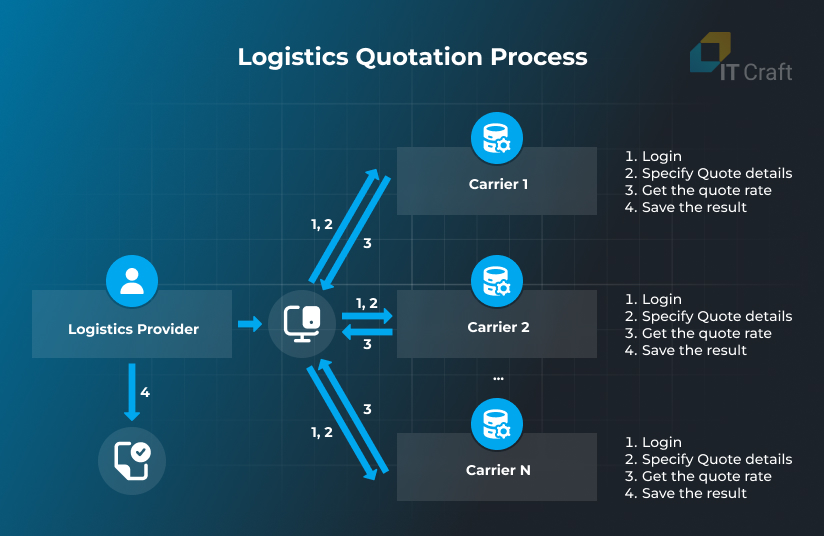
Logistics providers can send only one request to get quote rates from all connected carriers using an API provided by a freight management system.
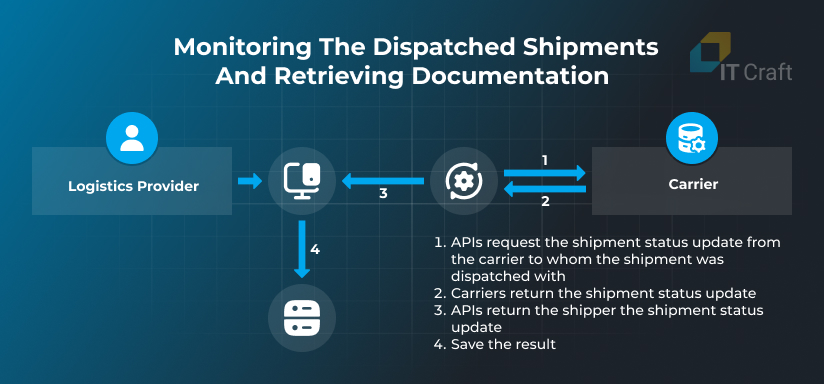
The same goes for monitoring the dispatched shipments and retrieving documentation.
Without an API, logistics providers must visit carriers’ websites to check status updates. With an integrated tracking API, shipment status updates are sent to the provider’s TMS once the connected freight management system receives them from the carrier’s API.
The tracking API also returns shipment documents, such as proof of delivery (POD), signed bill of lading (BOL), and invoice, so the logistics provider does not need to request documents via a call or email.
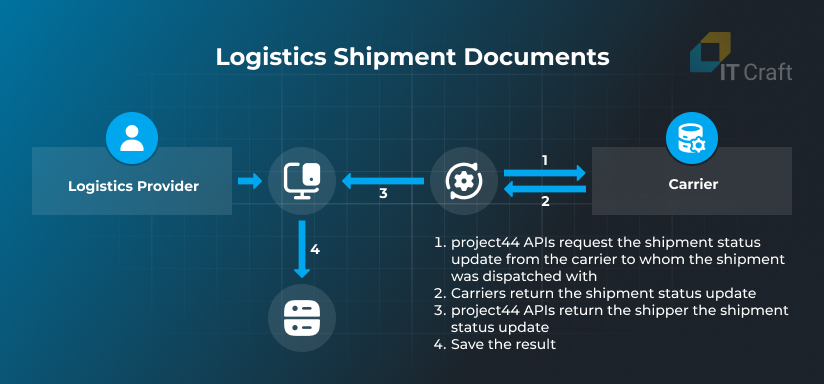
Workflow for Integrating a Freight Management System
The team trusted with the API integration project needs to:
- Decide on which of the provided shipment types and APIs will be added. For example, only those API types will be selected and connected when your TMS works with Less than Truckload (LTL) and Volume shipment types.
- Set up the connection between the TMS back end and APIs using the SDK or direct HTTP requests to authorize access to API endpoints.
- Build the Data Mapping Model to align the entities and their data types between two systems.
- Seamlessly connect the TMS with the selected APIs and ensure a smooth data exchange.
Let’s review the integration process step-by-step.
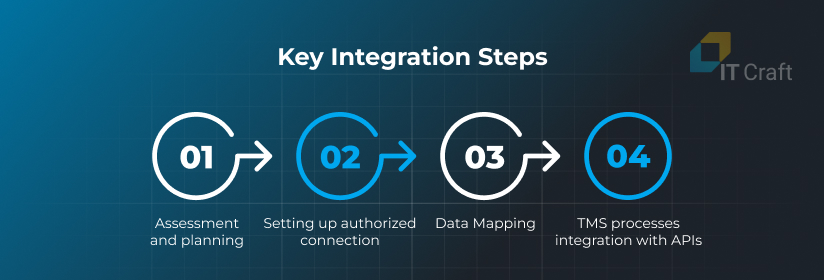
Assessment and Planning
At this step, the project team completes a list of transportation operations across the TMS and determines all TMS sub-processes that will connect to the specific API.
The typical list includes:
- Setting up the integration between the shipper location(s) and carrier(s) (capacity provider).
- Requesting the quote rates based on the shipment details.
- Showing the quote rate to the user.
- Dispatching the shipment with the most beneficial carrier’s rate.
- Updating the shipment status with the information provided by the carrier (location, status, exceptions) to create real-time visibility.
- Provide the shipper with the documents assigned to the shipment by the carrier.
Setting Up Authorized Connection to Selected APIs
Generally, freight management platforms provide a RESTful API using JSON, XML, or similar formats to send information.
Shippers and integration partners must acquire valid credentials to use the platform and provide the required authentication to the API endpoints.
The freight management system can provide a Software Development Kit (SDK) to simplify the integration process. The SDK can include client library code for all APIs, simplifying access with the integration team’s preferred languages.
Using an SDK, you do not have to handle every request and response (authorization, managing tokens, etc.). You only need to specify your credentials and start data exchange without extra coding.
Data Mapping
Data Mapping involves aligning the entities and their types between the shipper’s TMS and the selected FMS. Effective data mapping ensures that both systems can communicate seamlessly and that the data remains consistent and meaningful.
Software developers must ensure that the data is transformed into fields with the correct names and data types (integer, numeric, string, DateTime format, etc.). Similarly, the data returned from the FMS platform must be converted into the expected and accepted format.
Transformations ensure accurate information transfer, interpretation, and use within the TMS.
Need help assessing your project needs?
Let’s determine the scope of work and required actions.
Contact Us
TMS Processes Integration with APIs
The list of APIs supporting the entire transportation management flow includes:
- Location and Location Integration APIs
When logistics providers want more rates returning to the quote, they require more carrier connections.
A freight management platform needs to grant access to carriers’ APIs with which the logistics provider has already established a connection to run multiple quotes from different carriers and make dispatches.
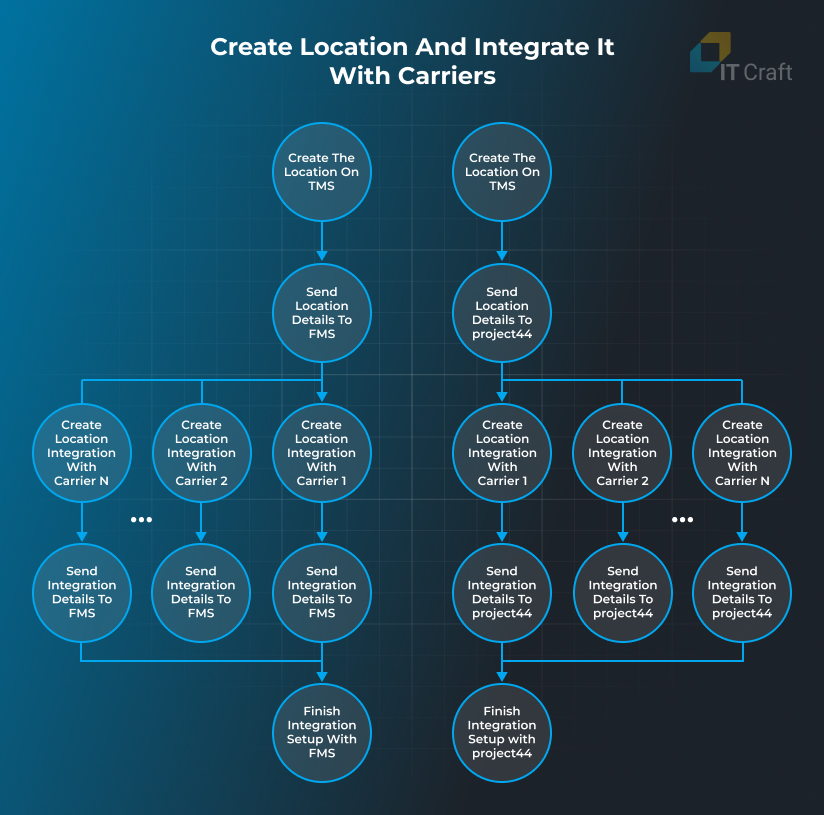
A logistics provider can have several locations connected to the company (warehouses, factories, etc.) where the shipment can be picked up or delivered. Every location can require integrations for carriers with a specified location inside their service areas.
To create a location, the logistics provider has to send:
- detailed address,
- first name,
- last name,
- phone number, and
- email of a contact person.
The location is created for the logistics provider account only once and can be changed/deleted in the future.
To create location integration, the logistics provider needs to send the carrierэs API credentials, which the carrier representative has assigned. These credentials grant access to the carrier API for quoting, dispatching, and tracking the shipment statuses within the freight management system.
- Quoting API
Quoting API serves as a loop between the shipper and every carrier’s API. The shipper specifies all required quote details to get accurate rates, including:
- pickup and delivery addresses,
- pickup date,
- unit descriptions, such as: dimensions, weight, requested accessorials, special instructions, hazardous materials information, and others.
The shipper can also request special services called accessorials:
- notify before pickup and/or delivery,
- inside pickup and/or delivery,
- inbound freight,
- protection from the freeze,
- etc.
In response, the freight management system’s API returns a combined list of quote rates that it retrieves from every integrated carrier. Each rate includes:
- carrier code,
- price (total/detailed),
- transit time,
- carrier’s notes, if provided,
- details on requested accessorials (availability and applied additional fees),
- and so on.
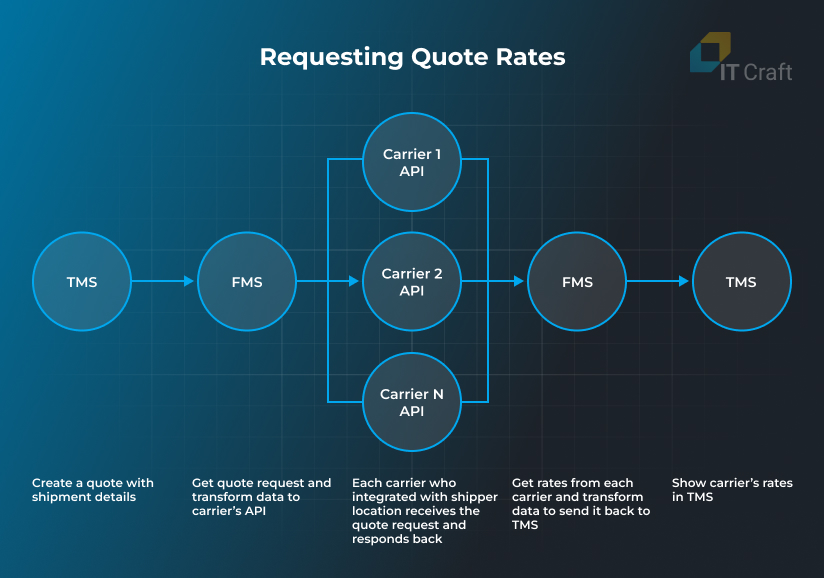
Even if the carrier returns an error, the shipper can review it, amend quote details, and request the rate again.
Carriers can also provide several delivery options (Service levels), such as:
- guaranteed by noon,
- guaranteed by 5 pm,
- expedite,
- etc.
In this case, the shipper receives several rate options from each carrier with different prices and delivery times, which can be useful for resolving deliveries on short notice.
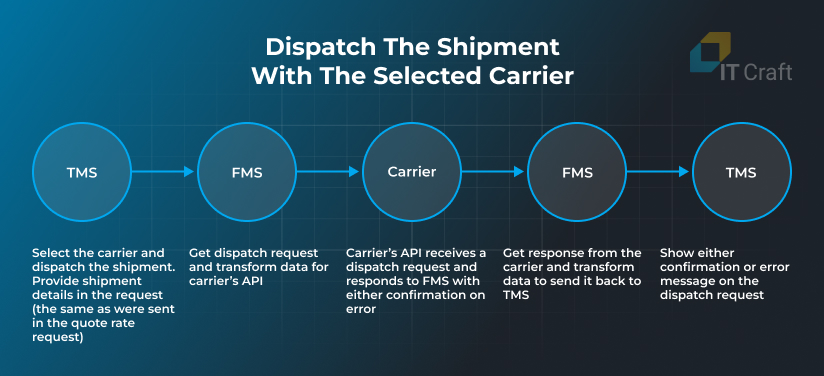
- Dispatching API
After reviewing carrier proposals of quote rates, the shipper chooses the best fit and requests a pickup for the shipment, i.e., makes a dispatch request. In the request, the shipper provides detailed information about the shipment. Usually, it includes the following:
- detailed pickup and delivery address,
- time slots for pickup and delivery,
- billing address,
- detailed description,
- special details, e.g., of hazardous materials,
- shipment identifiers (BOL Number, Customer Reference Number, Purchase Order, PRO Number),
- and others.
After successful dispatch, the carrier returns confirmation via the FMS platform with shipment references, such as pickup or PRO number. The shipper will use these identifiers, along with the BOL Number, Customer Reference Number, and Purchase Order, to request tracking updates from the carrier.
Technically, when the shipper makes a dispatch request, the FMS platform also automatically sets up a scheduler or job that, based on pickup and delivery dates, starts requesting updates from the carrier using the above-mentioned shipment identifiers. This process is called ‘Tracking Initialization’.
A platform can also allow shippers to initialize the tracking directly by hitting a dedicated endpoint. This feature is similar to “Manual Dispatch” functionality widely used in TMSs. However, unlike with a TMS, the shippers do not send a dispatch request to the carrier. Instead, they initialize shipment tracking on the FMS side.
This process requires manual action from shippers. A manager must call the carrier and provide them with all the shipment information needed for pickup. Once the shipment appears in the carrier system, the FMS will receive updates and send them to the shipper’s TMS using Webhook technology.
- Shipment Tracking API
Shipment Tracking API ensures visibility of the shipment delivery from the TMS. After dispatching or tracking initialization, the freight management system retrieves shipment updates according to a schedule using the provided identifiers.
As a result, the TMS does not need to send requests to get tracking data. Instead, the freight management system sends them back using Webhook. In tracking updates, the FMS provides detailed information about the shipment transition, such as:
- address of each interline point,
- date and time of arrival, and
- statuses description.
The tracking information also contains links to shipment documents, which the shipper can download as soon as the FMS receives them from the carrier.

! Summing Up
Modern freight management platforms provide comprehensive tools that simplify connecting them to client software. To connect your TMS/ERP software to a supply chain visibility solution, you need:
- valid credentials provided by a supply chain visibility platform
- credentials from your carrier(s)
- a list of APIs you want to integrate
- data mapping for efficient data transformations
In turn, freight management systems empower logistic providers’ software by automating routine activities and establishing transparent quoting/transportation processes.
FAQs
Freight management systems streamline shipment monitoring and related data exchange between logistics providers and carriers. FMSs provide APIs for:
- quote request
- dispatching
- shipment tracking, including shipment status updates and documentation retrieval
Here are the key four stages of freight management system integration:
- Assessing business needs and planning implementation.
- Purchasing and setting up an authorized connection.
- Mapping data.
- Integrating TMS processes with relevant APIs.
Visibility in the supply chain means a clear view of statuses for goods, products, or supplies, preferably in real time. Shiploads have the lowest visibility levels, while truckloads have the highest.
Here are some possible steps for increasing supply chain visibility:
- enhance collaboration with carriers by creating transparent delivery standards and requirements
- implement an analytics system to determine a delivery’s costs and performance
- consider automating routine processes
- conduct regular audits to assess bottlenecks and inefficiencies
- integrate a specialized platform that aggregates information from multiple carriers and provides real-time updates
- develop an ecosystem that facilitates collaboration and data exchange with your carriers