Less-Than-Truckload application program interfaces (LTL APIs) take center stage. They offer shippers and 3PLs solutions a robust toolset for optimizing the shipment lifecycle—from quoting to delivery while managing multiple carriers.
If you are evaluating cost-efficient options that can optimize supply chain operations immediately, this guide is for you.
The first part of the guide assesses the best freight management solutions you can integrate via an API and the required integration steps.
The second part of our API integration guide will help you understand the integration workflow for the SMC³ platform, a leading provider focusing on automation and real-time insights for LTL shipments.
Connect to Our Expert
Kateryna Hrankina
Head of Strategic Partnership at IT Craft
Get in touch
1
How does Integrating SMC³ APIs Improve Shipment Processes?
Businesses relying on isolated internal processes miss opportunities for cost savings and increased fulfillment accuracy. Moreover, they risk being outpaced by tech-savvy competitors relying on process automation and seamless data exchange with third-party systems.
In the traditional, siloed process, shippers must manually interact with each carrier by visiting their websites to request quotes. This approach significantly increases processing time and extends the selection of the most cost-effective and convenient shipment options.
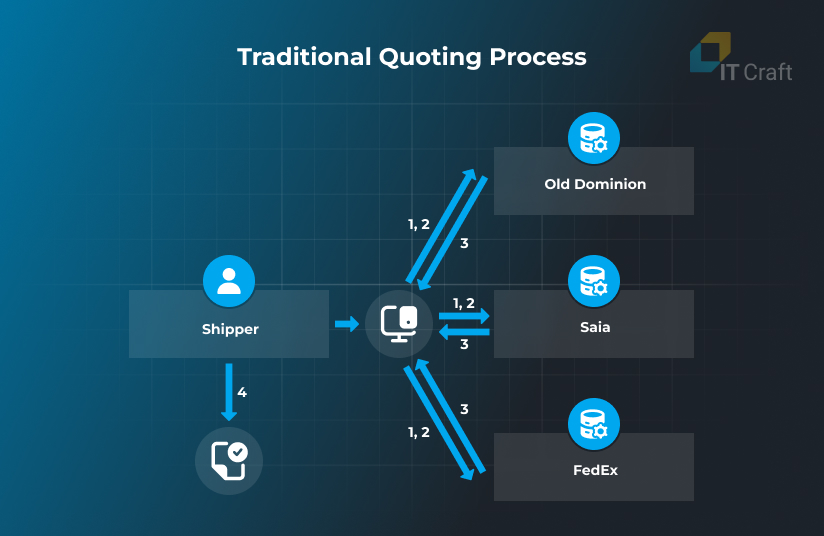
Traditional quoting process
- Log in.
- Specify quote details.
- Get the quote rates.
- Save the result.
Shippers can eliminate these inefficiencies by integrating the Transportation Management System (TMS) with the SMC³ system. They can send a single request through the SMC³ platform, which does all the heavy lifting to retrieve quote rates from all connected carriers simultaneously.
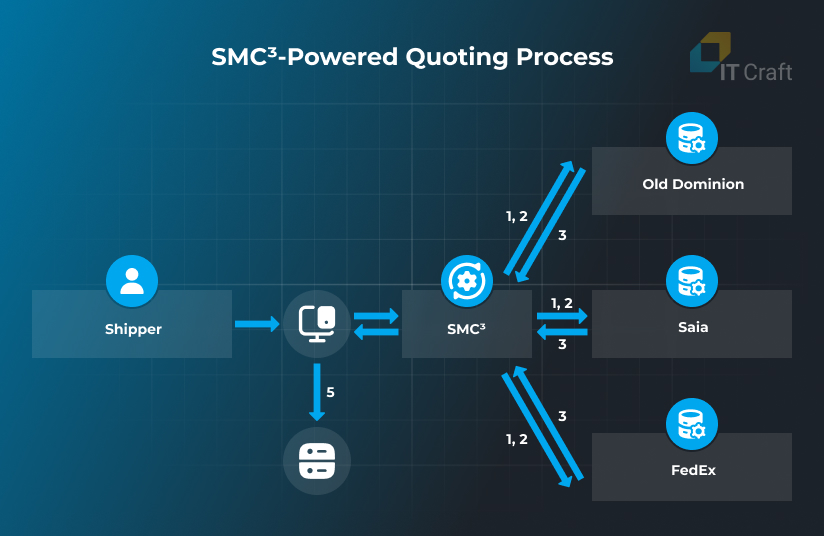
SMC³-powered quoting process
- Specify quote details and request rates.
- SMC³ APIs request the quote rate from every carrier connected with the shipper.
- Carriers return quote rates to SMC³ APIs.
- SMC3 APIs return multiple shipment quote rates in a single response.
- Save the result.
There is more. Traditional monitoring of dispatched shipments is equally cumbersome and requires shippers to check shipment statuses and important documents on each carrier’s website. This process consumes significant time and increases the chances of delays and errors.
By integrating the SMC³ platform, shippers can eliminate inefficiencies. SMC³’s Status Notification API and Document Notification API provide real-time visibility into shipment progress and streamline document management through webhook technology. Here’s how the entire flow works:
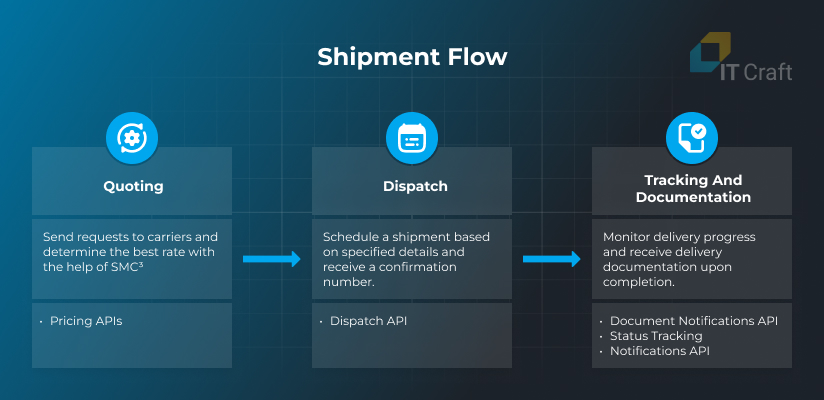
Real-Time Shipment Status Updates
The Status Notification API automatically pushes shipment status updates to the shipper’s TMS as soon as the API retrieves them from the carrier’s API. These updates can include several statuses, such as:
- Picked Up – The carrier has collected the shipment from the origin location.
- In Transit – The shipment is currently moving through the carrier’s network toward its destination.
- Out for Delivery – The shipment is on the final leg of its journey and is expected to be delivered soon.
- Delivered – The shipment has successfully reached its final destination.
- Exception – An issue has occurred and may affect the shipment's delivery, such as delays, damage, or an incorrect address.
- Info – General updates related to shipments that do not fall into other categories, such as customs clearance or special handling instructions.
SMC3 APIs push all relevant updates directly into the shipper’s TMS, ensuring real-time visibility and fast decision-making.
Automated Document Retrieval
The Document Notification API provides shippers with access to important shipment documents, such as:
- Bill of Lading
- Delivery Receipt
- Invoice
- Weight & Inspection Certificate
These documents are delivered via webhook as soon as they become available from the carrier. Process automation eliminates phone calls or email requests, significantly reducing administrative overhead.
2
Key Benefits of SMC³ LTL API Integration
SMC³ LTL API is a crucial data exchange and management tool that focuses on automation and real-time insights. It allows reduced delivery costs, improved customer experiences, and a competitive market position.
Provided SMC³ functionality enables shippers to:
- collect price quotes and delivery timelines from multiple carriers at once
- schedule shipment pickups and receive a confirmation in the TMS without extra calls/emails
- receive PRO numbers for dispatched shipments immediately
- send shipment data and special instructions to carriers and get shipping labels in return
- monitor delivery progress and receive real-time updates
- retrieve shipment documents
3
Approaches to Integrating with SMC³ APIs
There are two primary approaches to integrating SMC³ APIs to a shipper’s TMS, using direct URL-based HTTP requests and with the help of the SMC³ Software Development Kit (SDK):
URL-Based HTTP Requests
In this approach, developers set up HTTP endpoints for a direct interaction between your system and SMC³ APIs.
Pros and cons of using direct-requests approach:
Pros:
- Flexibility: Offers complete control over request construction and handling.
- Customization: Easily integrates into systems with unique requirements or custom workflows.
- Independence from a programming language: Works with any programming language capable of making HTTP requests (e.g., Python, JavaScript, Java, etc.).
- Complexity: Requires manual authentication handling, error responses, and data mapping.
- Development Time: Higher time investment compared to SDK integration.
SMC³ Software Development Kit (SDK)
SDKs simplify integration by providing prebuilt libraries and methods for common operations, such as authentication, API requests, and error handling. Currently, SMC³ SDKs are available in popular languages like Java and C#.
Pros and cons of SDK approach:
Pros:
- Ease of Use: Abstracts low-level API details, reducing development effort.
- Faster Development: Prebuilt methods save development time and reduce complexity.
- Consistency: Ensures standardized interaction with SMC³'s APIs, minimizing integration errors.
- Language Dependency: Development is limited to the languages supported by the SDK (e.g., Java and C#).
4
SMC³ Integration Flow
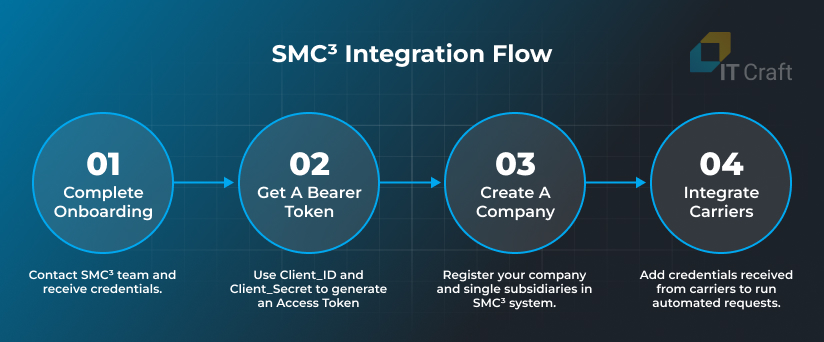
1. Complete Onboarding
The onboarding process with SMC³ ensures your organization can interact seamlessly with the selected APIs. This step includes:
- Registering your organization in the SMC³ system by contacting the Client Success Team.
- Providing essential company information and details about the APIs you wish to use (e.g., Pricing, Tendering, Visibility).
- Receiving your unique Client_ID and Client_Secret, which are required for API authentication.
2. Get a Bearer Token
Next, you should use the emailed Client_ID and Client_Secret to receive an Access Token via a Token Retrieval API. You need to pass the received Access Token in the header of your requests each time you send them to LTL APIs.
The Access Token’s expiration time depends on the applied SMC³ security requirements. It needs to be refreshed after it expires.
SMC³ advises against hard coding the expiration time. Instead, it suggests using each Access Token during the entire lifetime for multiple API requests, as issuing tokens for each new request can lead to a significant performance drop.
3. Create a company
At the next step, you need to register your organization in the SMC³ system via Create Company API. You can register one company for the entire organization or several companies for different subsidiaries when those require separate integrations with local carriers.
Each company receives an EVA Access ID that you must save as X-Eva-Access-Id to the database. Your system will pass the X-Eva-Access-Id to SMC³ APIs together with the company’s credentials to ensure calls to the relevant carrier APIs.
4. Add Carrier (Credential Requirement and Add Credential API’s)
The last step is integrating carriers through the SMC³ platform. You must receive the required credentials from each carrier, e.g., upon registration on the carriers’ websites and providing necessary information about your business.
After the carrier issues credentials (user name or account number, password, API key), you can proceed with integration while leveraging:
- Credential Requirement API – provides integration requirements and explains mandatory fields for a specific carrier upon entering its SCAC (Standard Carrier Alpha Code)
- Add Credential API – sets up your credentials, ensuring secure data exchange with the selected carrier.
Upon successful completion of the above four steps, you can correctly access carriers’ APIs from SMC³ and receive personalized quotes.
5
SMC³ Quoting Flow
SMC³ offers a wide range of Pricing APIs that provide access to various pricing models, including:
- contract rates for pre-negotiated agreements,
- dynamic rates that adapt to market conditions, and
- volume pricing for shipments that exceed standard LTL thresholds.
You can quickly retrieve accurate and comprehensive rate information from multiple carriers, compare costs and transit times, and, eventually, make informed shipping decisions using provided Pricing APIs.
Additionally, SMC³’s Pricing APIs support advanced configurations, such as accessorial charges, service levels, and custom shipment details, ensuring that shippers receive tailored quotes that align with their unique requirements.
SMC³ Pricing APIs Overview
SMC³’s Platform offers the following five types of Pricing APIs:
- Aggregate Pricing API
- Contract Pricing API
- Dynamic Pricing API
- Volume Pricing API
- Broker Pricing API
Here are the differences:
1. Aggregate Pricing API:
- Combines multiple pricing modes (Contract, Dynamic, and Volume) within a single request.
- Provides shippers with a consolidated list of rate quotes from multiple carriers for easy comparison.
- Supports an array of SCAC codes, enabling shippers to retrieve rates for multiple carriers in a single request.
Best suited for optimizing transportation costs and transit time decisions.
2. Contract Pricing API:
- Retrieves rates based on pre-negotiated contracts with carriers.
- Requires class/weight combinations for shipments and specific accessorial details.
Best suited for shippers with established carrier agreements seeking predictable rates.
Note: This API is designed to work with a single carrier. Integration with the Aggregate Pricing API makes this API unnecessary, as the former already includes contract rates
3. Dynamic Pricing API:
- Retrieves fluctuating rates based on market conditions (e.g., supply and demand, fuel surcharges).
Useful for time-sensitive or flexible shipments where spot pricing is crucial.
Note: This API is designed to work with a single carrier at a time. Integration with the Aggregate Pricing API makes this API unnecessary, as the former already includes contract rates.
4. Volume Pricing API:
- Retrieves spot rates for shipments exceeding standard LTL weight or volume thresholds.
Commonly used for shipments that require special handling or when full truckload rates are not feasible.
Note: TThis API is designed to work with a single carrier at a time. Integration with the Aggregate Pricing API makes this API unnecessary, as the former already includes contract rates.
5. Dynamic Pricing API:
- Retrieves rate quotes from freight brokers for a single shipment.
- Expands pricing options for shippers by incorporating intermediary quotes.
- This API is designed to work with a single carrier at a time.
Useful for time-sensitive or flexible shipments where spot pricing is crucial.
Note: This API is designed to work with a single carrier at a time. Integration with the Aggregate Pricing API makes this API unnecessary, as the former already includes contract rates.
Essential Quote Parameters
To successfully interact with SMC³’s Pricing APIs, certain parameters are required. These parameters ensure accurate pricing calculations across all Pricing APIs. While specific APIs may have additional fields, the common parameters include:
1. Origin Information
Details about the shipment’s starting location:
- city: The city of the origin.
- stateProvince: The state or province of the origin.
- postalCode: The postal code of the origin.
- postalCode: country: The country of the origin (e.g., “US” for the United States).
2. Destination Information
Details about the shipment’s delivery location:
- city: The city of the destination.
- stateProvince: The state or province of the destination.
- postalCode: The postal code of the destination.
- postalCode: country: The country of the destination (e.g., “US”).
3. Shipment Information
Details about the shipment itself:
- totalWeight: The total weight of the shipment (in pounds or kilograms, depending on the unit of measure).
- commodities: An array of items within the shipment, including:
- classification: Freight class (e.g., “100”).
- weight: Weight of the individual item.
- pieces: Number of pieces for the item.
- packagingType: Type of packaging (e.g., “Pallet”, “Crate”).
- stackable (optional): Whether the items are stackable (true/false).
4. Accessorials
Optional services that may impact pricing:
- codes[]: A list of accessorial codes (e.g., “LiftgateDelivery”, “InsideDelivery”, “HazardousMaterial”).
- shazardousContact (if hazardous materials are included):
- name: Contact name.
- phone: Contact phone number.
5. Carrier Information:
- Specific details that carriers need to include in the pricing request:
- carriers[]: An array of carriers, including:
- SCAC: Standard Carrier Alpha Code (e.g., “UPGF”, “FEDEX”).
- evaAccessId: The EVA Access ID for the carrier.
6. Payment Information:
- Details about how the shipment will be paid for (required for some APIs):
- terms: Payment terms (e.g., “Prepaid”, “Collect”).
- payer: Who is responsible for payment (e.g., “Shipper”, “Recipient”).
7. Transit Details:
- Information about the desired transit schedule:
- pickupDate: The requested pickup date (in YYYY-MM-DD format).
- serviceLevels[] (optional): A list of desired service levels (e.g., “Standard”, “Guaranteed”).
8. Unit of Measure:
- Specifies the measurement system (optional if defaults are provided):
- weight: Weight units (e.g., “Pounds”, “Kilograms”).
- dimensions: Dimension units (e.g., “Inches”, “Centimeters”).
PRO Assignment API
PRO (Progressive Rotating Order) numbers are unique identifiers that carriers assign to shipments. The PRO Assignment service provides the next available PRO number for the specified carrier that will be used to track and manage the shipment throughout the transportation process.
The PRO Assignment API allows shippers to request a PRO number from carriers before the physical shipment occurs. However, not all carriers support PRO assignments. The Credential Requirements API can be used to check if a specific carrier does.
The basic information requested by the PRO Assignment API includes:
- city,
- state/province,
- postal code,
- country, and
- carrier SCAC code.
6
SMC³ Dispatch Flow
The dispatch process involves:
- scheduling a shipment pickup with an LTL carrier for Standard or Guaranteed service levels, and
- receiving a confirmation number upon approval from the carrier.
SMC³ provides the Dispatch API for processing dispatch requests. Each request provides several key fields needed to schedule and process a shipment pickup with a carrier successfully:
1. dispatchCode:
Indicates the type of request.
- TEST: Test request, no actual dispatch with the carrier.
- CREATE: Create a dispatch request for an actual pickup.
2. service:
Contains details of the service level for the dispatch request.
- level (string): Specifies the level of service for the dispatch. Example: GTD_NOON (Guaranteed Noon delivery).
- delivery (object): Further delivery-related information.
3. shipmentComments:
Additional comments the shipper wants to share with the carrier. It is important to remember that the string length may be truncated to meet carrier-specific length constraints.
4. payment:
Contains payment details for the shipment.
- terms: Defines the payment terms (e.g., Prepaid, Collect).
- payer: Identifies who is responsible for the payment (e.g., Third Party).
- currency: The currency used for payment (e.g., USD).
5. pickupAvailability:
Contains details about when the shipment is available for pickup.
- date: Date the shipment is available to be picked up (YYYYMMDD, today or future date).
- startTime: Earliest available pickup time (HHMMSS).
- endTime: Latest available pickup time (HHMMSS).
- closeTime: Time the shipper’s location closes (HHMMSS).
6. commodities (array):
Contains a list of commodities being shipped and product details.
7. accessorials:
Optional request for accessorial services (additional services beyond transportation, such as handling hazardous materials or residential delivery).
- codes: List of requested accessorial service codes.
- hazardousContact: Contact details if hazardous materials are involved.
8. referenceNumbers:
Includes shipment reference numbers that can be passed to the carrier.
- bol: Bill of Lading number (e.g., B22222).
- po: Purchase Order numbers.
- pro: PRO number (e.g., D44444).
- estimate: Estimate number from the carrier (e.g., E55555).
- additionalReferences: Other reference numbers.
9. origin:
Details about the shipment/shipper’s location.
- name: Shipper’s company name.
- address: Shipper’s street address.
- city: Shipper’s city.
- stateProvince: Shipper’s state or province.
- postalCode: Shipper’s postal code.
- country: Shipper’s country code.
- contact: Contact details of the shipper.
10. destination:
Details about the shipment destination/recipient’s location.
- name: Recipient’s company name.
- address: Recipient’s street address.
- city: Recipient’s city.
- stateProvince: Recipient’s state or province.
- postalCode: Recipient’s postal code.
- country: Recipient’s country code.
- contact: Contact details of the recipient.
11. requestor:
Details about the person or company requesting the dispatch.
- name: Requestor’s company name.
- contact: Requestor’s contact details.
12. billTo (object):
Information about the person or organization responsible for the shipping charges.
- account: Account number used for the carrier’s pricing agreement.
- name: “Bill To” company name.
- address: “Bill To” address.
- city: “Bill To” city.
- stateProvince: “Bill To” state or province.
- postalCode: “Bill To” postal code.
- country: “Bill To” country code.
13. customsBroker:
Details about the customs broker for cross-border shipments.
- contact: Contact information of the customs broker (name, phone number, email).
API integration is faster with expert software developers
Share your challenges with our experts in logistics software development. We can help you with efficient implementation.
Contact Us
7
Shipment Tracking and Document Retrieval in SMC³
After dispatch, you need to register your shipment to receive tracking and document updates:
- Use Document Notifications API, where you need to provide the SCAC and Document_Types with the parameter ALL and proNumber.
- Use Status Tracking Notifications API where you need to provide SCAC and proNumber/BOL/PO/CustomerReference.
Two approaches are available for tracking and documentation:
- automated via registering webhooks, and
- manual via calls to Status API and Document API.
Automated Tracking via Webhook Registration
You need to register two webhooks with the SMC³ system to enable real-time notifications for shipment statuses and documents, which you can complete using Create Callback Endpoint API.
They are registered using the same URL but with different service (“DOCUMENT” or “STATUS”) and endpoint (webhook URL) parameters to handle different notification types. This implementation ensures that each webhook receives the appropriate data on shipment status or document updates.
Webhooks enable developers to implement tracking history within their system by storing incoming notifications. This approach minimizes frequent manual requests and provides a detailed and continuous view of the shipment lifecycle.
Manual Tracking and Documents APIs
The manual tracking can be used to fetch shipment information on demand. It involves making two separate API calls to retrieve the relevant shipment information (documents and status updates):
- Use Document API to request the shipment documents. You need to provide the following fields:
SCAC – carrier identifier.
documentType – type of document to retrieve:
- BL – Bill of Lading.
- DR – Delivery Receipt.
- INV – Invoice.
- WC – Weight & Inspection Certificate.
proNumber – unique tracking number associated with the shipment.
Note: You cannot retrieve all documents in a single API call. Instead, you should make a separate API request for each document type (e.g., Bill of Lading, Invoice),
- Use Status API to check the status of a shipment by passing various parameters and track progress. The following fields are required:
- SCAC – Carrier code.
- proNumber – Unique shipment identifier.
Optionally, you can replace the PRONumber with the following parameters:
- bol – Bill of Lading number.
- po – Purchase Order number.
- pickup – Pickup reference number.
- customerReference – Customer reference number.
Both APIs work together to give you a complete view of the shipment’s progress and associated documentation.
Need help with automating API requests?
Let’s start with a free project assessment. Schedule a call with our senior logistics developers today.
https://itechcraft.com/contact/
8
IT Craft Expertise in Integrating SMC³’s LTL APIs
With 25+ years of delivering top-notch solutions for evolving business needs, IT Craft engineers can help you assess your integration project and determine a cost-efficient implementation strategy.
Our team can help you at any stage of your project, including:
- project audit and feasibility analysis
- upgrades and feature expansion
- scaling and automation
- software modernization
- transfer to SMC³ from another tracking platform
- updates, maintenance, and infrastructure optimization
- and beyond
You can hire several senior experts or an entire dedicated team on short notice to quickly handle your requirements.
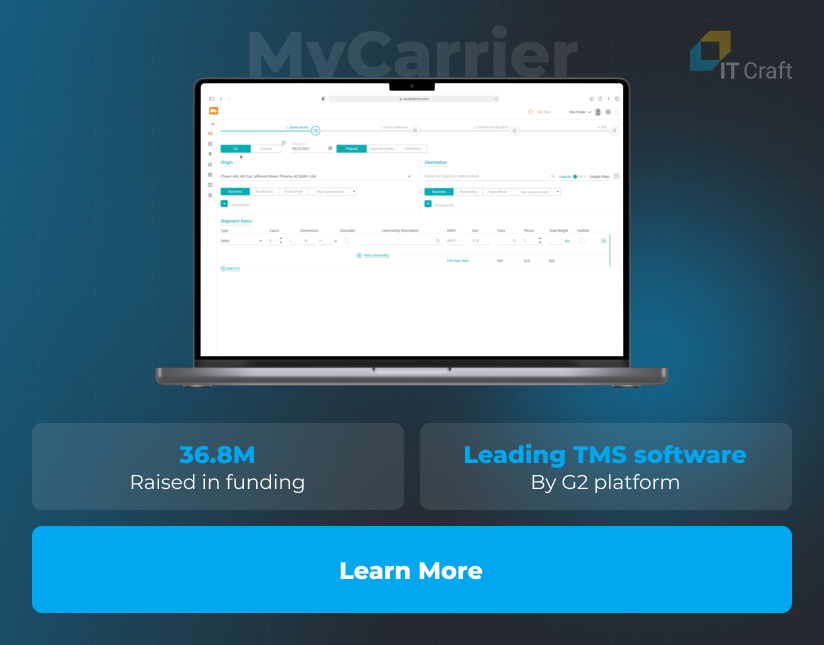
MyCarrier
The IT Craft dedicated team helped the startup implement its vision of a cutting-edge management system for LTL and FTL shipments, ensuring a seamless third-party integrations and delivering the project MVP within the estimated timeline.
Assigned developers helped MyCarrier efficiently manage growing tech needs while working on project migration to the cloud and its transfer to the SMC³ platform without interruptions for end users.
!
Conclusion
Integrating your system with SMC³’s LTL APIs provides unmatched efficiency and visibility in managing LTL shipments. It eliminates manual bottlenecks, enhances accuracy, and fosters collaboration across the entire supply chain, from pricing and tendering to real-time tracking and document retrieval.
By embracing digital transformation with SMC³, you can achieve operational excellence, reduce costs, and deliver exceptional service in the highly competitive freight industry.